


Most replatforms, rebrands, and CMS swaps lose meaningful organic traffic in the first quarter, and the recovery takes the rest of the year. We’ve watched it happen to enough Australian businesses that we built a tool to put a dollar figure on it before the project gets signed off.
The SEO Migration Risk Calculator is now live on the Bring site. Free to use. Tell it how much revenue your business does, what share comes from organic search, and what kind of migration you’re running. It returns the monthly revenue you stand to lose without specialist oversight.
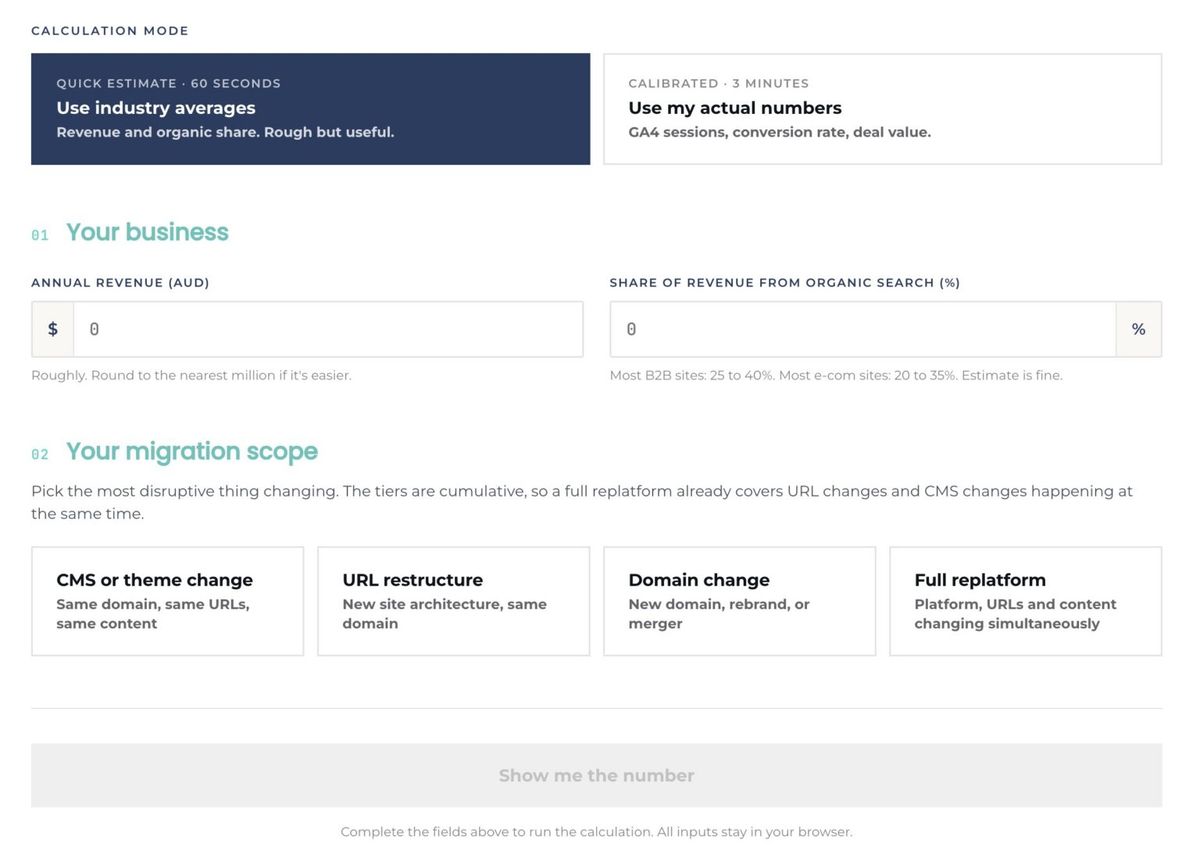
The SEO Migration Risk Calculator on bring.au. Two numbers, one scope choice, one figure that should change how your migration project gets briefed.
Why We Built It
Migrations get briefed as IT projects. They’re sold by developers, scoped against design milestones, and signed off by people who care about whether the new site looks better than the old one. Almost no one in that approval chain is accountable for what happens to organic traffic the day the redirect file goes live.
The result is predictable. Organic search drives 25 to 40 per cent of revenue for most established Australian businesses. When a migration is mishandled, that traffic doesn’t recover for nine to twelve months, and a chunk of it never comes back. The cost shows up in next quarter’s revenue, long after the dev team has moved on.
The calculator exists because the conversation needs to happen earlier. If your migration is going to bleed $182k a month from your search-driven revenue, that’s a different conversation with your finance team than “we’re rebuilding the site”. This tool gives you the number to put in front of them.
How the Calculator Works
Two modes, depending on how much detail you want to give it.
Quick Estimate (60 seconds). Industry averages. You provide annual revenue and the share of revenue you think comes from organic search. The calculator infers the rest. Rough but useful. This is the mode for a first-pass conversation in a project meeting.
Calibrated (3 minutes). Your actual numbers. GA4 sessions, conversion rate, and deal or order value. Same model, sharper inputs. This is the mode for the business case document.
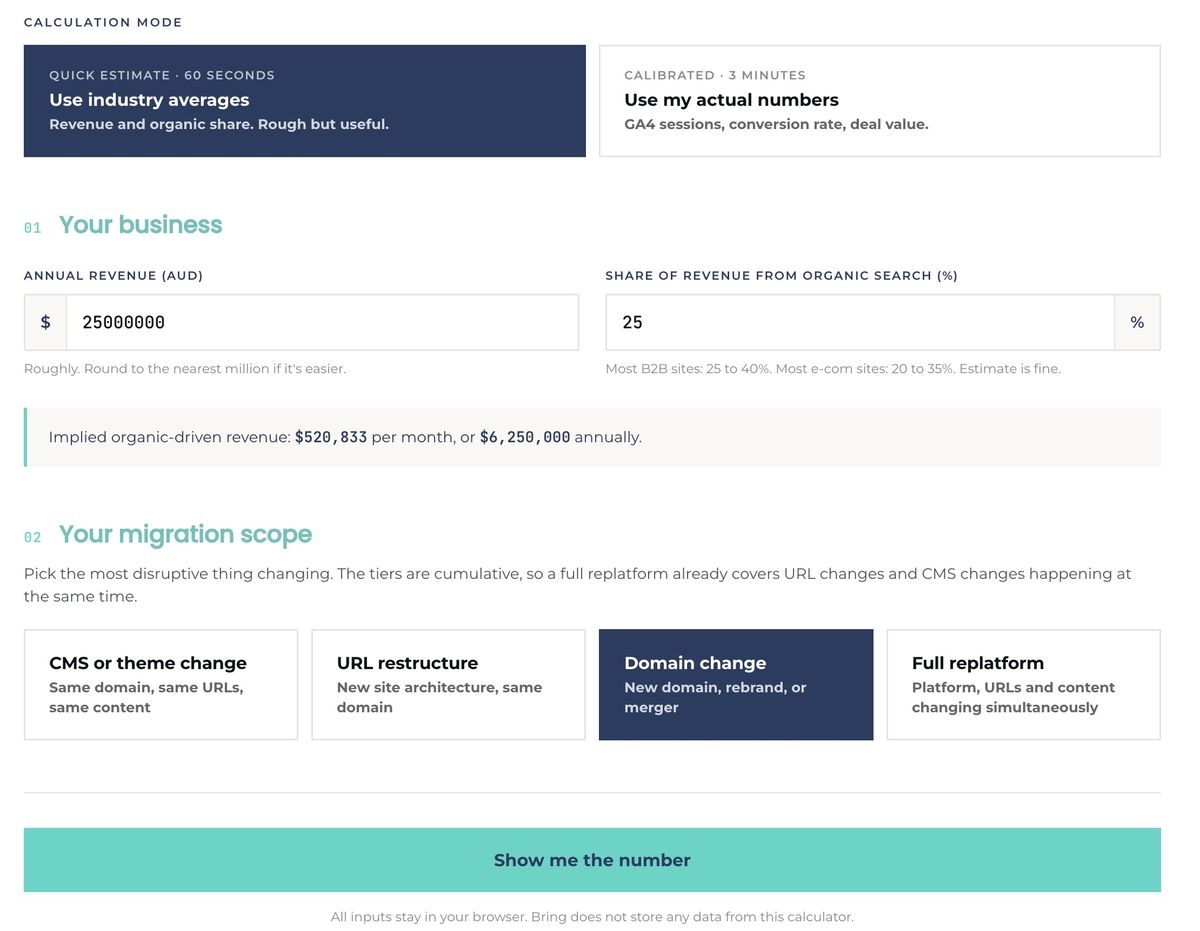
Once your business inputs are in, you pick the migration scope. This is the part most people skip when they think about migration risk, and it’s the part that matters most.
The Four Migration Tiers
Not all migrations carry the same risk. The calculator separates them into four tiers, ordered from least to most disruptive:
CMS or theme change. Same domain, same URLs, same content. You’re swapping the engine underneath, not the car. Lowest risk tier, but not zero, because rendering changes can affect how Google sees your pages.
URL restructure. New site architecture, same domain. The most common scenario in a redesign project, and the one teams most often underestimate. Every URL change is a redirect that has to hold link equity. Get the redirect map wrong and the rankings go with it.
Domain change. New domain, rebrand, or merger. You’re asking Google to transfer years of accumulated authority from one property to another. Recovery typically takes three to six months even when executed well. Done badly, the authority transfer never completes.
Full replatform. Platform, URLs, and content all changing simultaneously. The highest-risk migration, because every variable that influences search performance is moving at once. There’s no clean baseline to measure against and no single failure mode to fix when something goes wrong.
The tiers are cumulative. A full replatform already covers URL restructure and CMS change, so you pick the most disruptive thing happening and let the model handle the rest.
What the Output Tells You
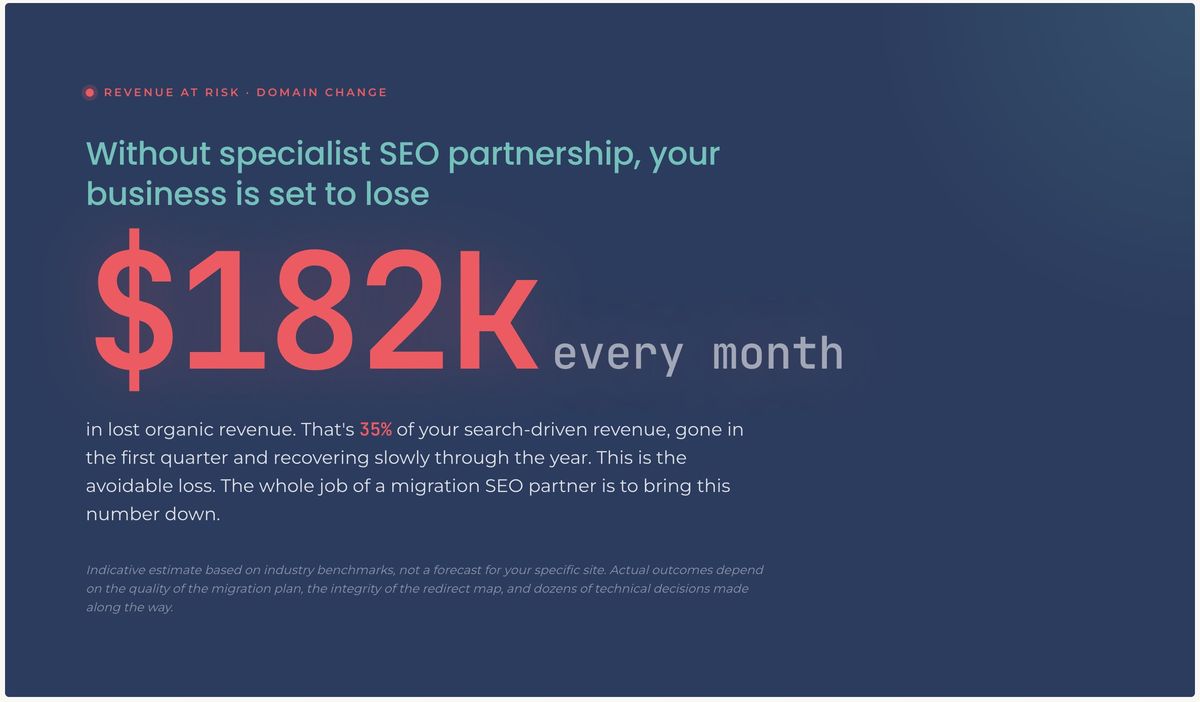
The calculator returns a single headline figure: the monthly revenue at risk if the migration is mishandled.
For a $25m business with 25 per cent of revenue from organic search running a domain change, that’s $182k per month in avoidable loss. Thirty-five per cent of search-driven revenue, gone in the first quarter and recovering slowly through the year.
This is the avoidable loss. The whole job of a migration SEO partner is to bring this number down. The calculator doesn’t tell you how much a partner will charge or guarantee a specific recovery curve. It tells you the size of the prize for getting the migration right.
What “A Bad Migration” Actually Looks Like
Poor migrations aren’t usually catastrophic in any single area. They’re an accumulation of small oversights that compound. The patterns we see when we audit migrations after the fact:
No URL map, or a URL map signed off without SEO review. Old URLs get redirected to the homepage by default, or to category pages that don’t match the original intent. Link equity dilutes. Rankings collapse for the most valuable pages first because they had the most authority to lose.
Redirect chains. Old URL redirects to an intermediate URL, which redirects to the new URL. Each hop sheds equity and slows page load. Crawlers eventually give up.
Lost technical signals. Schema markup not transferred. Canonical tags pointing at the wrong domain. Hreflang dropped on multi-region sites. Robots.txt accidentally blocking the new staging environment after launch. Each is a five-minute fix that becomes a six-week ranking problem if it slips through.
Content rewritten during the move. Migration timelines tempt teams to redesign content while they’re in there. The page that ranks number one for your money keyword is now a different page with different content, different headings, and different internal links. Google treats it as new. You start over.
No baseline. The single most damaging mistake. Without a documented snapshot of pre-migration rankings, traffic, backlinks, and indexed pages, you can’t tell what you’ve broken and you can’t measure recovery.
The Work That Brings the Number Down
The calculator quantifies the risk. The work below is what reduces it. Most of the actual SEO outcome is decided before a single redirect rule is written.
Technical baseline
Document every element that influences how search engines crawl and rank your current site. Site speed and Core Web Vitals scores. Mobile responsiveness. Server configuration, SSL setup, security protocols. Crawl budget patterns from Search Console. Schema markup and the rich results it powers. Indexation patterns by section. This is the snapshot you measure recovery against. Without it, you’re guessing.
Our technical SEO process treats the baseline as a deliverable in its own right, not a precursor.
Content inventory and URL mapping
Audit every page. Pull traffic, conversions, and backlinks for each one. Rank by commercial value. Then build the URL map: every old URL gets a documented destination on the new site, with a justification for the mapping. Pages that genuinely should be consolidated get consolidated. Pages that should be killed get killed. Nothing redirects to the homepage by default. That’s the laziest decision in SEO and it costs more than any other.
Backlink preservation
Pull a full backlink profile. Identify the top 50 to 100 links by authority. For high-value editorial links where it’s worth the effort, contact the original publisher and ask them to update the URL. Everything else relies on 301 redirects holding the equity, which they will if the redirects are clean and direct.
Internal linking architecture
The internal link graph is something you actually control, unlike the external one. Map how authority flows through your current site, decide what should change in the new structure, and brief the dev team on the linking patterns the new templates need to support.
Migration Day: A Compressed Checklist
This isn’t a complete website migration SEO checklist, that’s a 40-page document we share with clients. These are the items that, if missed, generate most of the avoidable losses:
- Server-level 301 redirects, not JavaScript or meta refresh. Configured in.htaccess or the Nginx config. Tested in staging before launch.
- No redirect chains. Old URL goes directly to the final new URL, in one hop.
- XML sitemap submitted on launch day. New sitemap to Google Search Console and Bing Webmaster Tools the moment the new site is live. Old URLs removed.
- Change of address request submitted in Search Console if the migration involves a domain change.
- Robots.txt verified on launch. Staging blocks removed. Sitemap reference correct.
- Schema markup transferred and validated. Run the new site through Google’s Rich Results Test for every template.
- Canonical tags pointing to the new domain across every page, including paginated and parameterised URLs.
- Internal links updated to the new URLs. Don’t rely on redirects for internal links. Update the source.
- Analytics and Search Console properties configured for the new domain before launch, with annotations marking the migration date.
Test every item in staging. Test again in production within the first hour of launch. The first 24 hours are when the worst issues surface and they’re the cheapest to fix at that point.
Post-Migration: What to Watch and When to Worry
Realistic recovery timelines, based on what we see across migrations we’ve audited or run:
- Initial indexation: 24 to 48 hours for the homepage and top-level pages.
- Substantial re-indexing of internal pages: two to four weeks.
- Branded query recovery: typically the first week. If brand searches drop and don’t recover, that’s a major red flag and almost always points to a technical issue.
- Competitive commercial keyword recovery: four to eight weeks for well-executed migrations. Three to six months for messy ones.
Monitor daily for the first month. Set automated alerts for organic traffic drops above 10 per cent, spikes in 404 errors, and significant ranking changes on your money keywords. Volatility in the first two to three weeks is normal. Sustained decline beyond week four is a signal that something hasn’t been fixed.
If your Core Web Vitals drop after migration, treat that as a ranking issue, not just a UX one. Google weights these signals more heavily each year.
When to Bring in Specialists
Internal teams can run small, simple migrations. The tipping point where you should engage an SEO agency is one or more of:
- Migration involves a domain change, not just a redesign on the same domain
- The site has more than a few hundred indexed URLs
- Organic search drives meaningful revenue (the calculator will tell you what “meaningful” looks like in dollars)
- The migration combines multiple changes at once, the Full replatform tier in the calculator
- The site has international or multi-region complexity (hreflang, regional subdomains)
- You don’t have a documented baseline of current performance
The work we do on SEO website migrations sits alongside your dev team, not in place of them. We own the URL map, the redirect logic, the technical signals, and the post-launch monitoring. The dev team owns the build. That division of responsibility is what keeps migrations clean.
For worked examples of how this discipline translates into commercial outcomes, see how we rebuilt search visibility for a B2B foodservice distributor in the From Invisible Catalogue to AI Cited Authority case study, and the structural SEO work behind B2B e-commerce growth on a re-platformed site.
Run the Numbers, Then Decide
The calculator takes 60 seconds in Quick Estimate mode and three minutes in Calibrated. The output is the conversation starter your migration project probably needs.
If the number is small, you’ve got confirmation that the SEO risk is low and you can run the migration with a lighter touch. If the number is large, you’ve got a quantified business case for either pulling in specialist help or pushing back on the timeline until the SEO work is properly scoped.
Use the SEO Migration Risk Calculator →
If you’d rather have a direct conversation about an upcoming migration, contact the Bring team on 03 7003 4346 or email hello@bring.au.
Frequently Asked Questions
How accurate is the SEO Migration Risk Calculator?
The output is an indicative estimate based on industry benchmarks, not a forecast for your specific site. Actual outcomes depend on the quality of the migration plan, the integrity of the redirect map, and dozens of technical decisions made along the way. The calculator’s purpose is to make the order of magnitude visible before the project starts, so it can be discussed at the right level of seniority.
What’s the difference between Quick Estimate and Calibrated mode?
Quick Estimate uses two business inputs (annual revenue and organic share) and applies industry averages to model the rest. It’s designed for a first-pass figure inside 60 seconds. Calibrated mode takes your actual GA4 sessions, conversion rate, and deal value, which gives a tighter figure suitable for a formal business case. Both modes use the same migration tier model.
Which migration tier carries the most risk?
Full replatform, where platform, URLs, and content all change at once. Domain change runs a close second because of the authority transfer challenge. CMS or theme change is the lowest risk tier when executed correctly, though it’s not zero. The tiers are cumulative, so the calculator handles overlap automatically when you pick the most disruptive change.
How long does SEO recovery take after a website migration?
Two to four weeks for well-planned migrations to see initial recovery, with full ranking restoration in six to eight weeks. Complex domain changes or migrations with technical errors can take three to six months. Branded queries recover fastest, often inside the first week, and they’re the early warning system: if brand queries don’t recover, there’s a structural problem to fix.
What’s the single biggest mistake in SEO migrations?
Failing to map every old URL to a relevant new URL with a clean 301 redirect. Mass-redirecting old pages to the homepage or a category page is the most common shortcut and the most expensive one. It collapses link equity and treats every legacy page as if it never had value.
Do my inputs to the calculator get stored?
No. All inputs stay in your browser. Bring does not store any data from this calculator. Use it as freely as you’d use a notepad.
Matt Hodgson is the founder of Bring and an SEO and AEO specialist with three decades in digital performance. He’s helped brands from enterprise to SMB grow their visibility across search and AI-driven discovery, building data-led strategies that connect organic performance directly to business outcomes.